
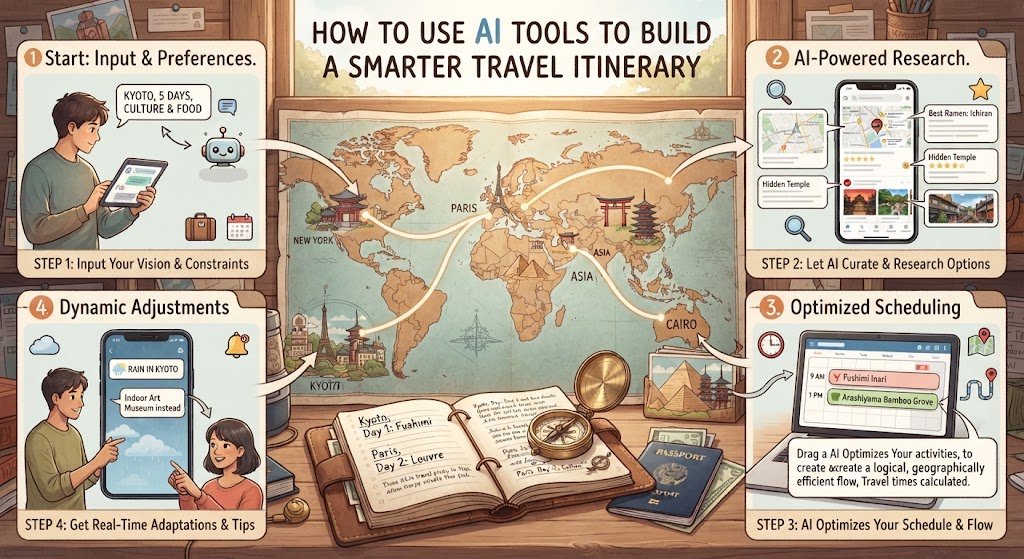

Planning a trip can be exciting, but putting together a useful itinerary often takes hours of research. Travelers have to compare destinations, transportation options, attractions, restaurants, opening hours, and travel times before they can create a schedule that actually works.
AI tools can make this process much easier. Instead of searching through dozens of websites and trying to organize everything manually, travelers can use AI to generate ideas, organize information, and adjust plans around their personal preferences. The key is knowing how to use AI as a planning assistant rather than relying on it for every decision.
Start With Your Travel Goals
Before asking an AI tool to create an itinerary, decide what you want from the trip. Think about the destination, number of days, approximate budget, travel style, and the activities you enjoy.
For example, a traveler might want a relaxed seven-day vacation with scenic views, local food, and a few cultural attractions. Another traveler may prefer a fast-paced city trip filled with museums, shopping, nightlife, and outdoor activities.
Giving AI these details helps it create recommendations that are more relevant. The more specific your preferences are, the easier it becomes to build an itinerary that feels personal instead of generic.
Give AI the Important Trip Details
AI works best when you provide clear information about your trip. Include details such as your destination, travel dates, number of travelers, transportation preferences, and approximate daily budget.
You can also mention practical preferences. For example, tell the AI if you prefer walking instead of renting a car, want to avoid very early mornings, or need frequent breaks during sightseeing.
A detailed prompt might ask for a five-day itinerary with a moderate budget, hotels near public transportation, local restaurants, and no more than three major activities per day. This gives the tool enough context to organize the schedule more effectively.
Use AI to Create a First-Draft Itinerary
Once you provide your basic requirements, ask AI to create a first draft rather than expecting the perfect itinerary immediately.
The first version can give you a useful framework for each day. It might suggest a morning activity, lunch area, afternoon attraction, and evening experience. You can then review the schedule and decide what you actually want to keep.
This approach is often better than trying to plan every detail at once. Start with the overall structure and gradually improve it.
Group Attractions by Location
One of the most useful ways to use AI for travel planning is to organize activities geographically.
If several attractions are located in the same neighborhood, visiting them on the same day can reduce unnecessary travel. AI can help identify logical groups based on the locations you provide.
For example, instead of crossing a large city multiple times in one day, you could dedicate one day to a historic district and another to a waterfront area. This can save transportation time and leave more room for actually enjoying the destination.
However, always verify locations and travel times using a reliable map or navigation service before finalizing your schedule.
Ask AI to Build a Realistic Daily Schedule
A common mistake in travel planning is trying to fit too many activities into one day. AI can help create a more balanced schedule if you specifically ask for realistic pacing.
Instead of requesting ten attractions in one day, ask for a schedule that includes travel time, meals, breaks, and some free time.
A realistic itinerary should not feel like a race. Leaving an empty hour or two can be valuable because unexpected delays, long lines, weather changes, or spontaneous discoveries are normal parts of traveling.
Use AI for Transportation Planning
AI can also help you think through transportation options between destinations. You can ask it to compare walking, public transportation, rideshare services, rental cars, trains, or other available choices.
For multi-city trips, AI can help organize the order of destinations and suggest where to place travel days. This can make a complicated trip easier to understand.
Still, transportation schedules and prices can change. Always confirm current departure times, routes, ticket requirements, and travel restrictions with official transportation providers before booking.
Let AI Personalize Your Activities
A good itinerary should reflect your interests rather than simply listing the most popular attractions.
Tell the AI what you enjoy. You might be interested in photography, architecture, beaches, hiking, food, history, art, shopping, or family-friendly experiences.
You can also tell it what you want to avoid. If crowded tourist attractions are not your preference, ask for quieter alternatives. If you love local food, request neighborhoods known for authentic dining experiences.
This can turn a basic sightseeing schedule into something that better matches your travel personality.
Use AI to Find Backup Plans
Travel plans do not always go exactly as expected. Rain, transportation delays, closures, or sold-out attractions can quickly change a day’s schedule.
AI can help you prepare backup options before your trip. Ask it to create an indoor alternative for a rainy day, a low-cost activity if your budget changes, or a nearby attraction that could replace a canceled experience.
Having a backup plan means you do not have to start researching from scratch when something goes wrong.
Ask AI to Improve Your Budget
Travelers can also use AI to organize a rough trip budget. Give it your estimated spending limits for hotels, transportation, meals, attractions, and shopping.
It can then help divide your budget across different categories and identify areas where you may be spending too much.
Keep in mind that AI-generated prices may not always reflect current costs. Use the suggestions as a planning estimate and verify actual prices directly with hotels, airlines, transportation companies, attractions, and restaurants.
Verify AI-Generated Travel Information
AI can be extremely helpful, but it should not be treated as the final authority for time-sensitive travel information.
Opening hours, admission prices, transportation schedules, hotel policies, seasonal events, and local regulations can change. AI may also occasionally provide information that is outdated or incorrect.
Before your trip, verify important details through official websites and other reliable sources. This is particularly important for flights, visas, passports, reservations, transportation, and attractions with limited availability.
Keep the Itinerary Flexible
A smarter itinerary is not necessarily the one with the most activities. It is the one that gives you enough structure while still allowing room for unexpected experiences.
Instead of scheduling every minute, consider creating a few fixed activities and leaving flexible blocks throughout the day.
You might reserve a museum visit in the morning, keep lunch flexible, and leave the afternoon open for exploring the surrounding neighborhood. This approach makes the trip feel less stressful and more spontaneous.
Use AI to Plan Multi-City Trips
AI can be especially useful when a trip involves several destinations.
For a multi-city vacation, provide the complete list of places you want to visit and the number of days available. Ask AI to organize the destinations in a logical order while considering transportation time.
It can help you visualize how many nights to spend in each location and where travel days should fit into the schedule.
Even so, check actual transportation routes before committing to the plan. A route that appears logical on paper may not be practical because of limited schedules, transfers, or seasonal service.
Create a Simple Final Itinerary
After reviewing and verifying the AI suggestions, turn the information into a simple itinerary that is easy to use while traveling.
For each day, include the main activities, approximate times, locations, transportation notes, reservations, and important reminders.
Avoid filling the final itinerary with unnecessary information. A clean schedule is easier to check from a phone while you are walking around a new city.
Common Mistakes to Avoid When Using AI for Travel Planning
One mistake is giving AI too little information. A request such as “plan my vacation” does not tell the tool enough about your budget, interests, pace, or transportation preferences.
Another mistake is accepting every recommendation without checking it. AI-generated travel information can become outdated, so important details should always be verified.
Travelers should also avoid creating an itinerary that is too crowded. Even if AI can produce a long list of attractions, that does not mean all of them belong in one trip.
Finally, do not forget to account for travel time, meals, rest, and unexpected delays. These small details can make a major difference in how enjoyable the trip feels.
Frequently Asked Questions
Can AI create a complete travel itinerary?
Yes. AI can create a detailed first-draft itinerary based on your destination, dates, budget, interests, and preferred travel style. You should review and verify important information before using the itinerary.
Is AI useful for planning a budget-friendly vacation?
Yes. AI can help organize estimated expenses and suggest ways to structure your spending. Actual prices should be checked because travel costs can change frequently.
Can AI plan a trip for families?
Yes. You can tell AI the ages of the travelers, preferred activities, transportation needs, and desired pace. It can then suggest a schedule designed around those requirements.
Should I trust AI for flight and hotel information?
AI can help you understand options, but current prices, availability, schedules, cancellation policies, and booking conditions should be confirmed directly with the relevant provider.
How detailed should an AI travel prompt be?
The more useful details you provide, the more personalized the result can become. Include your destination, dates, budget, interests, transportation preferences, travel companions, and activities you want to avoid.
Conclusion
AI tools can make travel planning faster and more organized by helping travelers develop ideas, structure daily schedules, group nearby attractions, estimate budgets, and prepare backup plans.
The smartest approach is to use AI as a planning assistant rather than a replacement for personal research. Start with your goals, provide detailed preferences, create a flexible first draft, and verify important information before booking anything.
With the right balance of AI assistance and human judgment, even complicated travel plans can become easier to organize, more flexible, and better suited to the way you actually want to travel.